OEM Digital Services
A guide for machine manufacturers who want to ship AI-powered digital services alongside their machines.
Machine manufacturers increasingly need to offer digital services together with their physical products — monitoring, analytics, predictive maintenance, remote diagnostics, and more and more often an AI assistant that actually knows the machine. The challenge is doing this at scale across dozens or hundreds of customer sites, each with different network constraints and maintenance schedules.
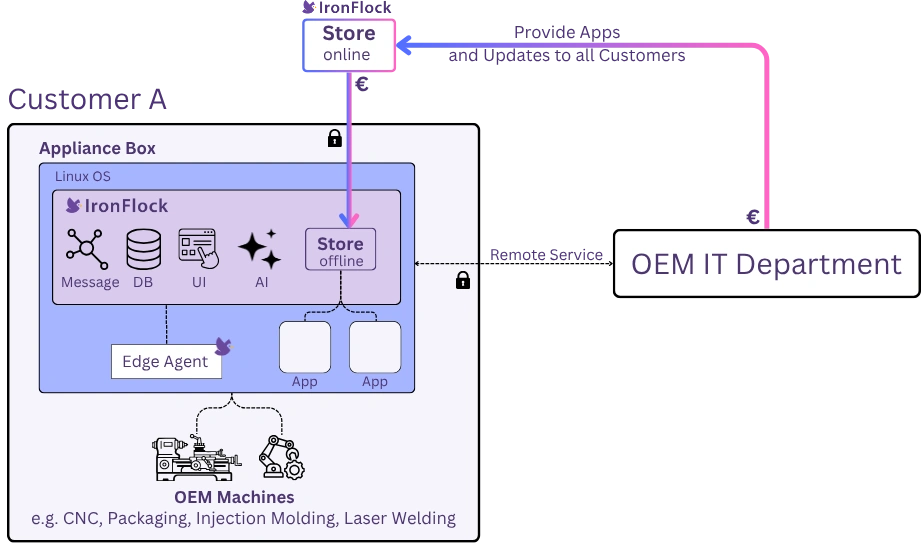
IronFlock provides a unified workflow for this: develop your digital service once, deploy it to every customer via a turnkey appliance, monetize it through built-in billing, and maintain it over time with a controlled update process — all while leaving the customer in full control of their local infrastructure.
Step 1: Develop Your Digital Service
Every digital service you offer to your customers is packaged as an IronFlock app. An app bundles everything into a single deployable unit:
- Edge software running on the device (any programming language, containerized)
- Custom-configured AI agents that carry your machine know-how
- A UI board to visualize data and interact with your software and machines
- A data schema defining what telemetry to collect and store
- Optional remote access tunnel configuration
The AI agents are where your domain expertise becomes an AI service: an app doesn’t just deliver software, it teaches the customer’s IronFlock assistant the skills to work with your machine — explaining live process data, answering questions about parameters and alarms, or guiding an operator through a fault. You define once what the agent knows and is allowed to do; every customer who installs the app gets that expertise on site.
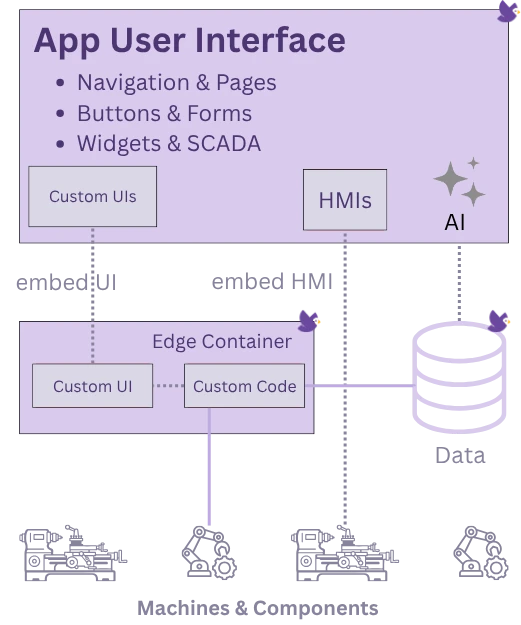
You develop the app once (e.g. in the IronFlock cloud IDE), test it against a development device, and release it to the App Store. The same app can then be deployed to all your customers.
For the full development workflow, see IoT App Development.
Of course your software stays your own. You can use it with any other IoT platform vendor if you like. IronFlock just helps you to embed your software into an end-to-end deployment lifecycle.
Step 2: Deploy via Appliance
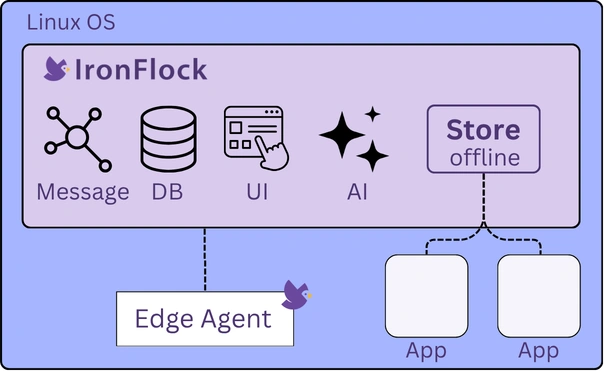
To deliver your digital service to a customer, you ship an IronFlock Appliance alongside the machine. The Appliance is a pre-configured, self-contained box that runs the complete IronFlock platform — no cloud connection, no DMZ, no Kubernetes cluster required. The customer plugs it into the local network, and it works.
How Delivery Works
- You choose the hardware (see the requirements)
- You setup the IronFlock software on the hardware with a single command as described here. Optionally you can already pre-install your App now.
- You ship the Appliance with the machine to the customer site
- The customer connects the Appliance to their local network — no IT involvement needed
- To provide maintenance and updates the customer enables online access for a short period of time.
Scaling to Larger Installations
The Appliance itself can act as both the platform server and an edge device. For larger installations — for example, a customer managing 100 CNC machines across a factory floor — additional edge PCs can be connected to the Appliance to extend coverage. These additional devices are managed centrally from the Appliance, just like any other IronFlock edge device.
For details on the Appliance architecture, app syncing, and other deployment models, see Deployment Options.
Step 3: Monetize Your Services
IronFlock includes built-in billing infrastructure so you can charge customers for the digital services you deliver. You don’t need to build your own licensing or metering system.
- Publish your app via private sharing (direct to specific customers, 10% service fee) or publicly in the App Store (20% service fee)
- Set pricing with flexible billing periods (monthly, yearly, one-time) and volume rebates for customers running many machines
- Automatic metering and invoicing — IronFlock tracks usage, generates invoices, and collects payments through Stripe
For the full monetization workflow including product setup, pricing configuration, and payout details, see App Monetization.
Step 4: Manage Your Digital Services Lifecycle
Once your customers are running your apps on their Appliances, you can continue to improve and expand your digital services over time. The update and delivery process works as follows:
- You release a new app version — or publish an entirely new digital service — in the IronFlock online App Store
- Your customers are notified by email that an update or new service is available
- The customer connects the Appliance to the internet briefly and pulls the new version (or new app) into their local App Store on the Appliance
- The customer deploys the update to their machines during a maintenance window of their choosing
This model ensures that the customer is always in control of the Appliance. You publish updates and new services; each customer decides independently when to apply them to their machines.
For details on app installation, updates, and device management, see App Management.
Step 5: Remote Service
Beyond delivering and updating apps, you can also provide hands-on service directly from the cloud. Accounts on a local Appliance can be linked to IronFlock Cloud accounts. Once linked, the cloud user can access the Appliance directly from the IronFlock Cloud dashboard to deliver services and configuration support — without ever traveling to the customer site.
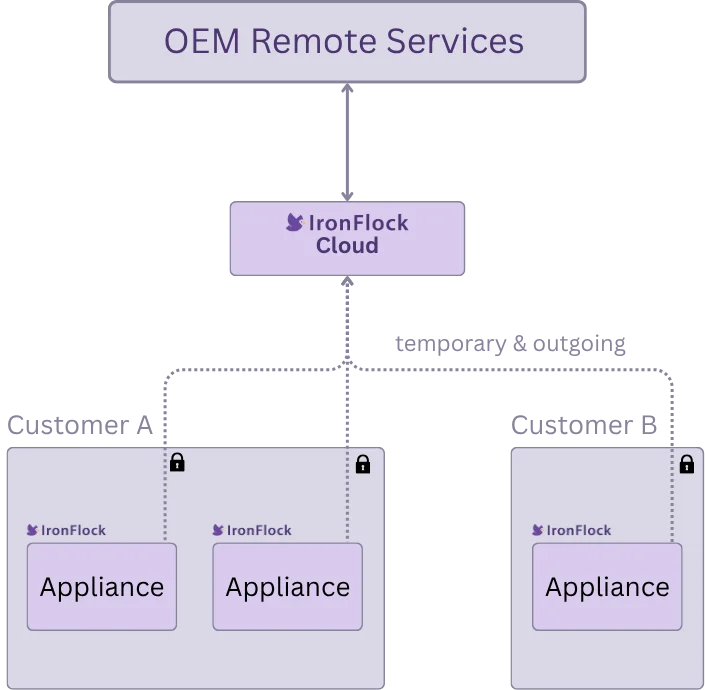
This means your OEM service technicians and account managers can support every client from a single central cloud UI, instead of connecting to each site individually.
- Link accounts — connect an account on the customer’s Appliance to an IronFlock Cloud account
- Access from the dashboard — the cloud user reaches the Appliance directly from the IronFlock Cloud dashboard for services and configuration support
- Serve all clients centrally — technicians and account managers manage every customer from one cloud UI
To enable this cloud access, the Appliance owner only has to briefly allow an outgoing connection to the cloud. No VPN, no DNS service, and no open ports on the Appliance are required — the customer stays in full control of when remote access is possible.
Putting It All Together
Consider a CNC machine manufacturer serving 500 factories worldwide. They develop a monitoring app — including an AI agent that knows the machine’s data, parameters, and typical failure patterns — release it to the App Store, and ship an Appliance with every machine. Each factory plugs in the Appliance, syncs the app once, and runs it locally — fully offline, with an on-site assistant that can answer questions about the machine from day one. When the manufacturer releases a predictive maintenance add-on six months later, each factory syncs the new app at their convenience and deploys it during their next scheduled downtime. Billing is handled automatically by IronFlock.
Five steps — develop, deploy, monetize, maintain, and service remotely — and your digital services scale with your machines.