IronFlock in Private Cloud
A full private-cloud deployment runs the entire IronFlock system — including the WAMP router, backend services, database, and container registry — on your own infrastructure. Devices connect to your IronFlock instance instead of the public cloud.
This is the enterprise deployment model for organizations that need to keep all platform data, device traffic, and application logic inside their own network boundary.
When to Choose Private Cloud
Private cloud deployment is designed for scenarios where devices cannot or should not reach the public internet, or where the organization itself requires full control over the platform:
- Classified environments — Government or military sites with strict network isolation.
- Industrial plants — Factories with air-gapped OT networks.
- Remote locations — Oil rigs, mining sites, or ships without reliable internet.
- Regulatory compliance — Industries requiring all data to remain on-premises (EU Data Act, NIS2, CRA, IT-SiG, KRITIS).
- Enterprise IT standards — Organizations with established Kubernetes platforms, identity providers, and security reviews who want IronFlock to fit into that stack.
What You Need
- A virtual private cloud setup with a cloud provider (AWS, Azure, Google, …) or bare-metal hardware.
- A server or cluster running Kubernetes (or Docker Compose for smaller deployments).
- Access to the IronFlock Helm charts.
- An IT team comfortable with Kubernetes, container registries, and certificate management.
Network Architecture
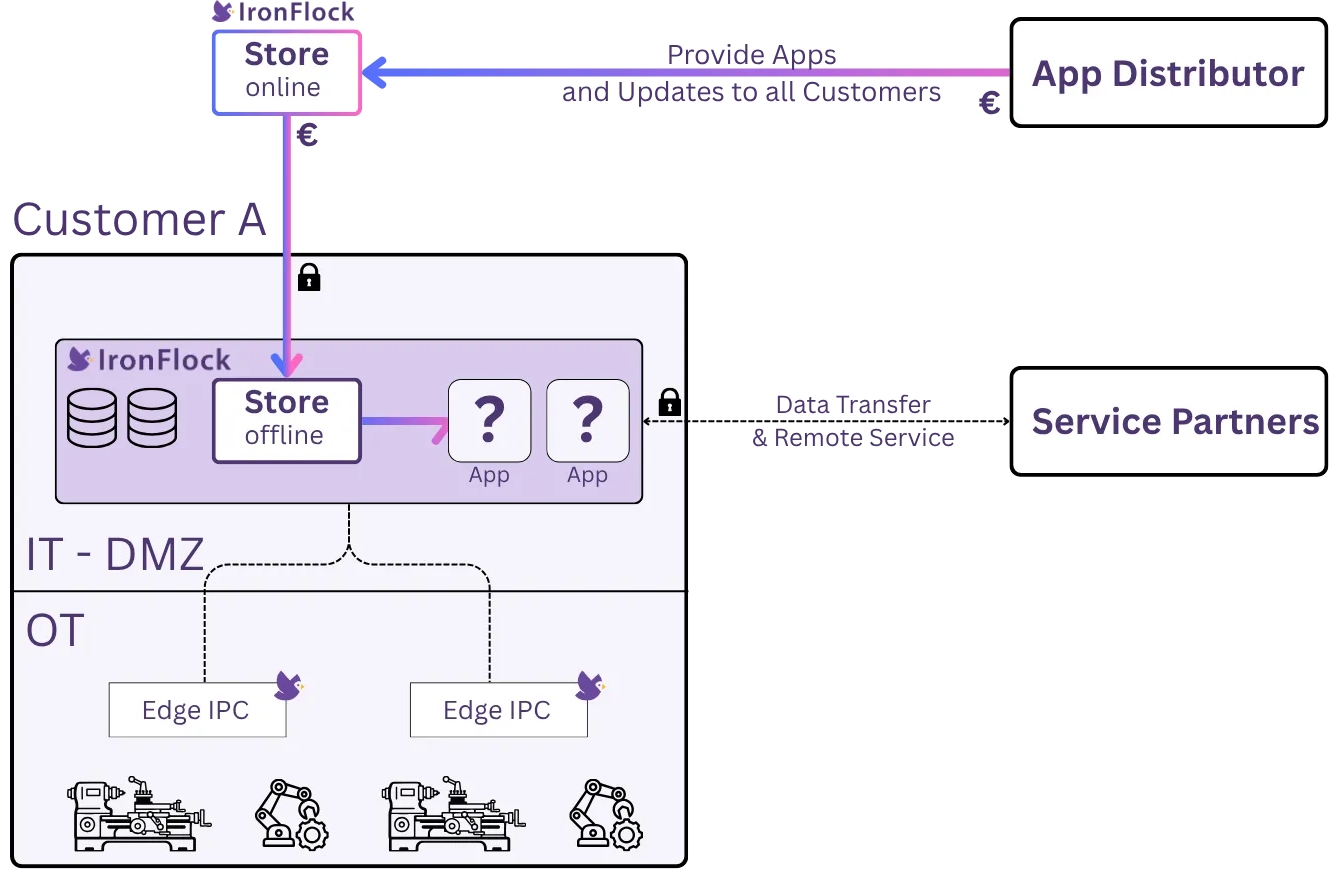
A typical private-cloud IronFlock deployment follows a DMZ architecture that separates the operational technology (OT) network from the IT network and, optionally, the internet.
Network Zones
- OT Network — Where your edge devices operate. Contains PLCs, sensors, gateways, and any hardware running the IronFlock agent. Devices only make outbound connections to the DMZ.
- DMZ Network — Hosts the IronFlock services. Accessible from the OT network (for device connections) and from operator workstations (for the web UI). Does not need internet access for normal operation.
- IT/Internet (optional) — Only required for syncing apps from the online IronFlock Store. Can be air-gapped with periodic manual imports.
Key Security Properties
- Edge devices never accept inbound connections — all communication is initiated outbound from the device to the WAMP router in the DMZ.
- The DMZ does not require internet access for day-to-day operations.
- Operator access to the IronFlock UI happens within the DMZ or over a controlled network path.
Deployment Steps
Private-cloud deployments use the same Helm charts as the cloud deployment with modified configuration:
- Provision infrastructure — Set up a Kubernetes cluster or Docker host in your DMZ network.
- Load container images — Pull all IronFlock service images and push them to your local container registry.
- Configure values — Adjust the Helm values file to point all services to local endpoints (database, WAMP router, registry).
- Deploy — Install the Helm chart with your on-premises values file.
- Flash devices — Use FlockFlasher to flash devices with a configuration pointing to your IronFlock instance in the DMZ.
AI Services
IronFlock’s AI features — including the AI assistant, multi-agent orchestration, and natural language queries — require access to a large language model provider. In cloud mode this is handled automatically. In private-cloud deployments, the IronFlock AI service needs outbound access to at least one of the following LLM APIs:
- Anthropic (Claude)
- OpenAI (GPT)
- Google (Gemini)
This can be a direct connection or routed through a proxy in your DMZ. If your environment does not permit any external API access, a custom large language model can be integrated on request — for example, a self-hosted open-source model running within your infrastructure. Contact the IronFlock team to discuss your requirements.
Syncing Apps from the Online Store
Private-cloud deployments include a local App Store — a private app catalog and container registry that serves apps to devices within your network. You can populate this local store by syncing apps from the public online IronFlock Store, provided the instance has an internet connection available at sync time. No permanent internet connection is required; a temporary connection is sufficient to pull the apps you need.
Prerequisites
- An account on the public ironflock.com platform.
- Your account on the private-cloud instance is connected to your ironflock.com account. The connection works the same way as on the Appliance (see Linking Accounts): open your Profile on the instance and click Email me the connect link in the Connect to ironflock.com section, then open the emailed link with your ironflock.com account. The instance owner’s admin account is connected automatically.
How App Sync Works
┌────────────────────┐                       ┌────────────────────┐
│  Online IronFlock  │  ◄──── account ─────► │  Private Cloud     │
│  Store (cloud)     │      connection       │  local Store       │
└────────────────────┘                       └────────────────────┘
         │                                            │
   apps available to                          sync button shown
the connected account instead of install- Open the local App Store — When the instance has an active internet connection, the App Store shows all apps that are available to your connected ironflock.com account on the online platform.
- Sync the apps you need — Instead of an Install button, each app shows a Sync button. Clicking it downloads the app — including its container images and metadata — from the online store into the local store.
- Add devices — Once synced, the app is fully available in your local store and you can add devices to it normally, with no internet connection required.
Update Workflow
When a new version of a synced app is published on the online store, a Sync button will appear again for that app. Connect the instance to the internet briefly, sync the updated release, and then roll it out to your devices through the standard app upgrade flow.
This design gives you full control over what enters your network — nothing is downloaded automatically, and the internet connection is needed only during the sync step.
Contact Us
Private-cloud deployments are configured in partnership with the IronFlock team. Contact us to discuss your requirements and get a deployment plan tailored to your environment.