Data Handling & Architecture
IronFlock provides a complete, end-to-end data collection and storage infrastructure designed for scalability, security, and clear data ownership — from the edge to the cloud. Whether routing telemetry from thousands of sensors or building real-time SCADA interfaces, IronFlock’s data architecture ensures secure, isolated, and accessible information.
Message Routing and Secure Realms
At the core of IronFlock’s real-time communication is a robust message routing cluster. This messaging infrastructure connects diverse edge devices within a project to each other and to the IronFlock cloud infrastructure.
To ensure strict data security and isolation, the routing cluster is semantically partitioned into secure realms. A realm acts as an isolated sub-network where messages are strictly contained; data and commands cannot leave or cross between realms.
Applications running on your edge devices can utilize the ironflock-sdk to communicate over these messaging realms using:
- Publish/Subscribe (Pub/Sub): Ideal for continuously broadcasting sensor telemetry or state changes.
- Remote Procedure Calls (RPC): Perfect for triggering direct actions or securely querying device status.
Dynamically Provisioned Project Databases
For persistent storage and historical analysis, IronFlock provisions a dedicated, physical TimescaleDB database for every project.
This project database serves as the central data collection facility for every app installed in the project:
- App Data Backends: All data backends of the apps installed under your project are securely housed within this database. Install a second app and it adds its own tables alongside the first — a project running several apps ends up with all of their data collected in one place, queryable together.
- Direct Ingestion: When device apps publish data using the
ironflock-sdk, this stream is directly received and organized within the project database. - Read access, with consent: An app reads only its own data by default, but with your approval one app can also read another app’s data in the same project — so apps can build on each other’s readings. You control and revoke that sharing (see below).
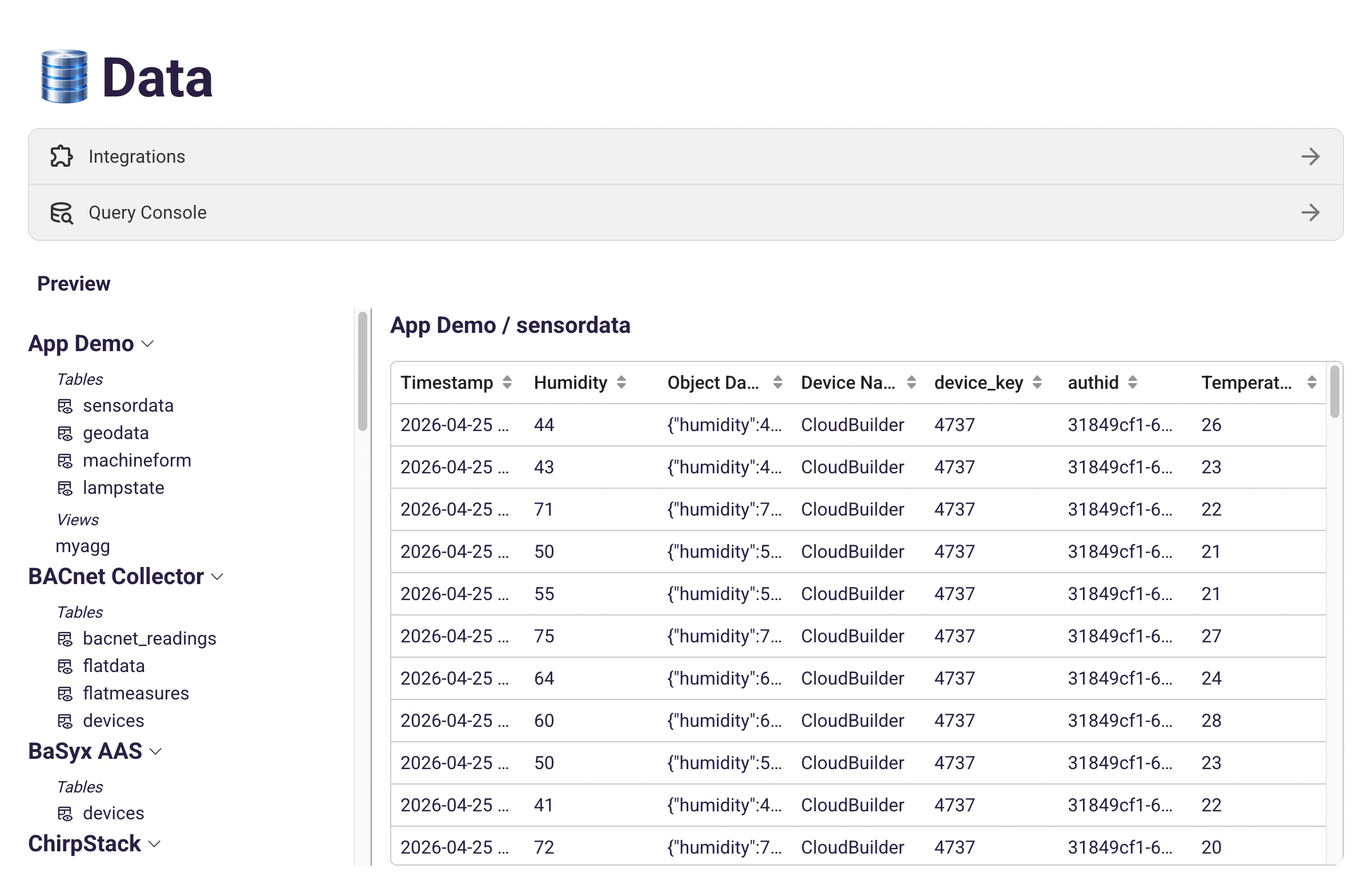
Because the project database acts as the single source of truth for your operations, it unlocks advanced capabilities:
- SQL Queries: Write powerful queries directly against your raw, historical tables.
- Physical AI Integration: Let the IronFlock AI agent extract, analyze, and query your data using natural language.
- Visualization Sources: The project database serves as the ultimate data source for live boards, IoT dashboards, and SCADA boards.
Custom Transforms
The tables an app writes are rarely the exact shape of the question you want to ask. Overall equipment effectiveness combines availability, performance and quality; a shift report needs hourly buckets; comparing two machines means joining the tables of two different apps. A custom transform answers such a question once: it is a SQL query, saved under a name, that afterwards behaves like any other table in the project.
Creating one is not an app-developer task. Any project member with the Data Access privilege — the same one that opens the SQL query console — can save a transform, and the IronFlock AI assistant can create one on request when a board needs a number that no raw table holds. Transforms live outside every app, in the project’s own IronFlock space, so a single transform can read across the tables of every app installed in the project.
- Write the query once. Develop it in the query console of the project’s data view and choose Save as transform, or go straight to the Transforms tab there. Source tables are referenced as
databackend_<key>.<table>— the names the data tree shows next to each app. - Choose how it is computed. A materialized transform stores its result and recomputes it on a schedule you set, at most once a minute. A plain view is computed on every read: always current, but only as quick as its query.
- Describe what it returns. The transform carries a description, and every result column carries a display name and a description of its own. They are stored with the transform in the database, which is what the widget editor shows and what the AI assistant reads — a well-described transform is one the assistant can still use correctly months later.
- Bind it like a table. The transform appears in the widget editor’s data picker under IronFlock, beside every app’s tables, and feeds the same live channel: when it refreshes, the boards bound to it refresh.
Writing a Transform That Behaves Well
A transform returns exactly the rows its own SQL selects. Widget time windows, calendar filters and the latest mode apply to tables and are ignored here, which makes three habits worth adopting:
- Bound the time range inside the query, for example
WHERE tsp > now() - interval '7 days'. A single read is also capped at 3000 rows, so aggregate in the query rather than selecting raw history. - Order a time series newest first (
ORDER BY <time column> DESC). Widgets then receive the rows oldest to newest, and where a row limit applies it keeps the newest ones. - Select every column you want to plot or filter by. A transform has no hidden timestamp or device columns: a widget can only use what the query actually returns.
If a transform stops working — an app it reads was uninstalled, a column it used disappeared — the Transforms tab shows the reason and the other transforms keep running. Reading a transform on a board follows the same access rules as any app’s data; Data Access governs only who may write one.
App developers can ship transforms with an app instead, declared in its data schema — see Transform Tables. Both kinds are read the same way.
The Project File Store
Not everything an app produces fits in a table. Alongside the project database, every project gets a private file store for objects — camera frames, PDF reports, firmware images, audio clips, exports — governed by exactly the same principles as the database.
- Every app gets storage automatically. When an app is installed, IronFlock provisions a private storage area for it in the project’s file store, just as it provisions the app’s database tables. Several apps pool their files into the one project store, each app’s objects clearly kept apart from the others’.
- The same ownership guarantees apply. The files belong to the project owner, not the app developer. You can browse, download, cap and delete them, and the developer of an app cannot see the files it collects while running in your project.
- Files link straight into your data. A stored object carries a permanent, access-controlled URL that an app can write into a database column — so a dashboard widget renders the image or document with no extra work, and revoking a user’s access to the project revokes their ability to fetch the files too.
- You govern the budget. Each app’s storage settings show how much it is using and let you set a storage limit, empty a table, or delete all of an app’s files. And for tools outside the platform — an analyst with DuckDB, a nightly backup — you can issue read-only S3 credentials scoped to a single app’s files.
The file store is browsable right beside the tables: the project’s data view shows a Files entry for every app, listing every stored object with its size, type and date. For the developer-side details — declaring storage, namespaces, retention and the SDK calls — see File Storage.
Sharing Data Between Apps
Apps in the same project are isolated by default: each reads and writes only its own tables and its own files. That is the safe starting point — an app you installed to meter energy has no business reading another app’s inspection photos unless you decide it should.
But apps often should work together — an analytics app reading a monitoring app’s history, a reporting app pulling photos from a quality app. IronFlock makes that possible through one consent decision that you control, in the consuming app’s settings:
- You approve exactly which providers an app may read, and you see the reason the app gives for wanting access. Nothing is shared without your explicit approval.
- One grant covers both halves of the hub — the provider app’s shared tables and its shared files. You do not manage database and file permissions separately.
- Access is read-only. A consuming app can look at another app’s data but never change or delete it.
- You can revoke at any time, and access stops immediately.
What is even offered for sharing is the app developer’s decision, made per table and per file namespace — some data an app keeps strictly internal, and that never appears as something you could grant. Of what is shareable, you decide whether to actually share it. The developer-side mechanics are documented in Consuming Data from Other Apps.
Data Ownership & the EU Data Act
IronFlock is built around a clear principle: the project owner is the data owner — not the app developer.
All data produced by apps — whether telemetry streams from edge devices, event logs, or derived analytics — is stored in the project database that belongs to the project owner. The app developer writes the app, but the data the app generates while running inside a project is the sole property of the project that hosts it.
This model directly aligns with the requirements of the EU Data Act, which grants users of connected products and related services full control over the data their devices generate. In IronFlock:
- Exclusive control. The project owner has full administrative control over the project database, including the ability to read, export, delete, and back up all data it contains.
- No silent data collection. App developers cannot access a project’s data without being explicitly invited. There is no hidden data pipeline from projects back to app developers.
- Portability. Because all data lives in a standard TimescaleDB instance, it can be queried with SQL, exported in open formats, and migrated at will — the project owner is never locked in.
- Granular sharing. The project owner can invite app developers, integration partners, or other stakeholders into the project and grant fine-grained access privileges to specific data areas. This makes it easy to benefit from third-party technical support, remote maintenance, or specialist analytics services — on terms the project owner defines and can revoke at any time.
In short: apps produce data, but the project owner owns, controls, and shares it. This ownership model is a first-class design goal of the IronFlock platform, not an afterthought.
Opting Out: Bypassing the IronFlock Data Pipeline
The IronFlock messaging layer and the project database are the recommended path — they give you real-time routing, durable storage, dashboard-ready data, and built-in ownership guarantees out of the box. However, IronFlock does not force apps to use this pipeline.
Apps running on IronFlock-managed devices are regular container workloads and retain full network and system freedom. If a project owner or app developer prefers a different data-handling stack, an app can:
- Push to external systems. Send data directly to third-party brokers (MQTT, Kafka, AMQP), cloud ingestion endpoints (AWS IoT, Azure IoT Hub, Google Cloud IoT), or custom REST / gRPC APIs.
- Use alternative storage. Write to an external database (InfluxDB, MongoDB, S3, customer-owned TimescaleDB, etc.) instead of — or in addition to — the IronFlock project database.
- Bridge to on-premises systems. Integrate directly with existing MES, ERP, historian, or SCADA systems over the local network without touching the IronFlock cloud.
- Mix and match. Publish a subset of data to IronFlock for dashboards and AI analytics, while streaming the full-fidelity data elsewhere.
This flexibility makes IronFlock a good fit both for greenfield deployments that embrace the platform end-to-end and for integrations into existing enterprise data architectures where the data destination is non-negotiable.
Using Data in IoT Dashboards and SCADA Boards
Putting your data to work visually is effortless. When you configure a widget in your IoT board or SCADA board, almost all properties (e.g., titles, values, colors) can be dynamically bound to live data from your project database.
When editing a widget in the Board Studio, you will find a data binding switch underneath the configuration fields. Selecting a specific column of a table establishes a real-time channel for that property. As new telemetry arrives in the database, the bound properties on your dashboard automatically update in real-time, requiring no manual UI refreshes.
Note: For a deep dive into connecting widget properties to your database, see the detailed section on data binding in the IoT Dashboards documentation.