IoT App Development
Build IoT applications using any programming language and use it with the devices in your project.
What Is an App?
An IronFlock app is much more than a piece of software running on a device. It is a complete, self-contained product unit that brings together everything needed to operate a device in the field:
- An edge component — your application logic, running on the device inside a container. This is only one part of the app.
- A board — the dashboard users open in their browser to visualize data and interact with the device, defined as part of the app itself.
- A data schema — the table definitions that tell IronFlock what telemetry to collect and store in the time-series database.
- Parameters — configurable settings that operators can adjust per device or group without touching the code.
- Remote access configuration — tunnel definitions that expose device-side web UIs (like Node-RED or Grafana) directly in the browser.
- AI integrations — optional AI agent configurations that can answer questions about the device’s data.
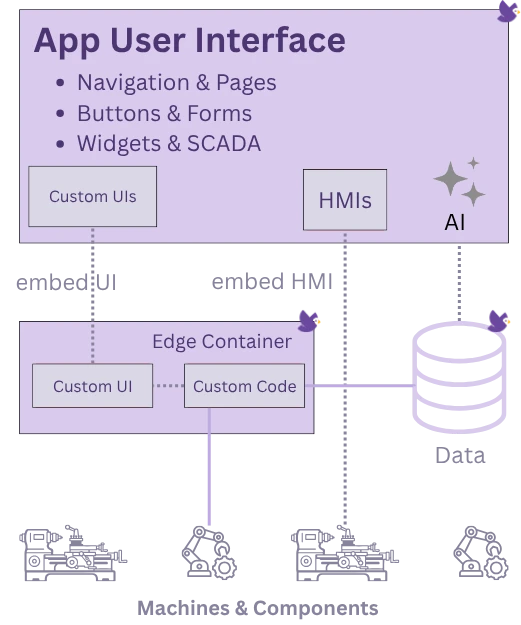
When an app is added to a device or a group, IronFlock deploys the edge component, wires up the data collection, and makes the board and remote access available — everything at once, over the air.
When to Develop Your Own App
The IronFlock App Store offers ready-made apps for common use cases. But building your own app makes sense when:
- You have existing software — if your application can run in a container, it can become an IronFlock app. Wrap it with an IronFlock app definition and you immediately gain a dashboard, data collection, OTA updates, and fleet management.
- You need full control over business logic — custom sensor processing, edge AI inference, protocol conversion, or domain-specific algorithms.
- You want a tailored dashboard — the built-in board editor lets you design exactly the visualization and controls your operators need, without writing frontend code.
- You are building a product — package your software as an IronFlock app and distribute it to customers via the App Store, with optional paid licensing.
- You need to standardize across a fleet — one app definition, deployed identically to thousands of devices, with centralized parameter management.
What You Get
Developing an app on IronFlock gives you:
- Over-the-air deployment — push updates to all devices with a single click, no SSH required.
- Out-of-the-box data storage — define a table schema once; IronFlock creates the time-series database and starts collecting data automatically.
- A built-in dashboard — no separate frontend service needed; the board is part of the app and hosted by IronFlock.
- Configurable parameters — expose settings (API keys, thresholds, addresses) that operators can change per device or per group without touching the code.
- Remote access tunnels — surface web UIs running on the device directly in the browser through IronFlock’s tunnel infrastructure.
- App distribution — publish to the App Store and make your app available to other IronFlock users or customers.
App Architecture
An IronFlock app is a self-contained package with six components:
| Component | Configuration File | Description |
|---|---|---|
| Edge code | Dockerfile | Application logic running on the device |
| Board | .ironflock/board-template.yml | User interface / dashboard |
| Data storage | .ironflock/data-template.yml | Database tables for telemetry |
| Parameters | .ironflock/env-template.yml | User-configurable settings |
| Remote access | .ironflock/port-template.yml | Tunneling ports for web UIs |
| AI agents | .ironflock/ai-template.yml | AI assistant integrations — see Defining Agents & Tools |
All configuration files in the .ironflock/ directory are optional. At minimum, an app needs a Dockerfile and your application code.
In This Section
- App Structure — How an app is organized
- Writing Edge Code — The cloud IDE and code editing workflow
- Docker & Compose — Containerizing your app
- Data Backend — Defining tables, collecting telemetry, latest-state tracking, and soft deletes
- Building Boards — Creating dashboards
- App Parameters — Exposing configurable settings
- Git Integration — Using GitHub, GitLab, or Bitbucket
- Releases — Publishing and deploying your app
- Pricing Your App — Setting up billing